- Check that all the cables are properly connected between the EYEN and the computer, reference connection illustrations shown in Figure 21.
- Check the power connection to the EYEN.
- If problem persists, perform each of the bullet item options below (in sequence) as required, until problem is solved:
- Restart the computer.
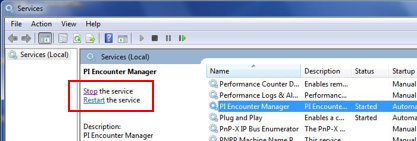
- Open Windows “Services,” and from the “Services” utility window, scroll to locate the “PI Encounter Manager” service.
- With the “PI Encounter Manager” service highlighted, select “Restart” to STOP and RESTART the service (see Image below).
- Shut down the computer, reconnect all the cables, and then restart the computer.
- Uninstall and re-install the software by following the instructions in the EYEN Installer CD shipped with the unit (Figure 1).
- Shut down computer, remove all cables from the EYEN module to the computer, install replacement cables, and restart computer.